

You can now ask ChatGPT or Claude how your Shopify store is doing. Type "what sold best last month?" and, with the right connection, you get an answer in a few seconds. The hard part was never getting an answer. It is getting one you would actually act on: right dates, right definition of a sale, and no invented numbers to fill the gaps.
This guide covers what to connect, five questions worth asking, and how to tell whether an answer deserves your trust. The examples are real answers from our demo store, Libos Active, whose orders and customers are made up for demonstrations.
Why ask an assistant at all
Shopify's reports are good. So are Google Analytics and Klaviyo. The trouble is that a simple question, like "is the new range working?", needs all three, plus a spreadsheet, plus twenty minutes you do not have on a Tuesday morning. An assistant that can read your shop's numbers turns that into one sentence, and it explains the answer in plain words instead of leaving you to read a chart.
It also changes who looks at the numbers. Owners who never open Analytics will happily ask Claude a question on their phone between orders.
What Shopify's own connector covers
Shopify has a free connector for Claude and a plugin for ChatGPT, and they are worth knowing about. They answer questions about your Shopify data, and they can also change products, prices and stock. According to Shopify's help pages (checked October 2026), they work with your Shopify data only and read your 50 most recent orders in detail.
That is fine for "how many orders today?". It is not enough for profit after refunds, for which products are about to sell out (Shopify keeps no stock history), or for anything that lives in Google Analytics, Search Console or Klaviyo. That gap is what an owner connector like ours fills.
Five questions worth asking
1. "What was my profit by product over the last 90 days?"
Revenue is easy to find. Profit is the question owners actually care about, and it is the one most reports skip. A good answer takes each item's price after discounts, subtracts refunds and the cost per item you have set in Shopify, and shows the margin product by product.
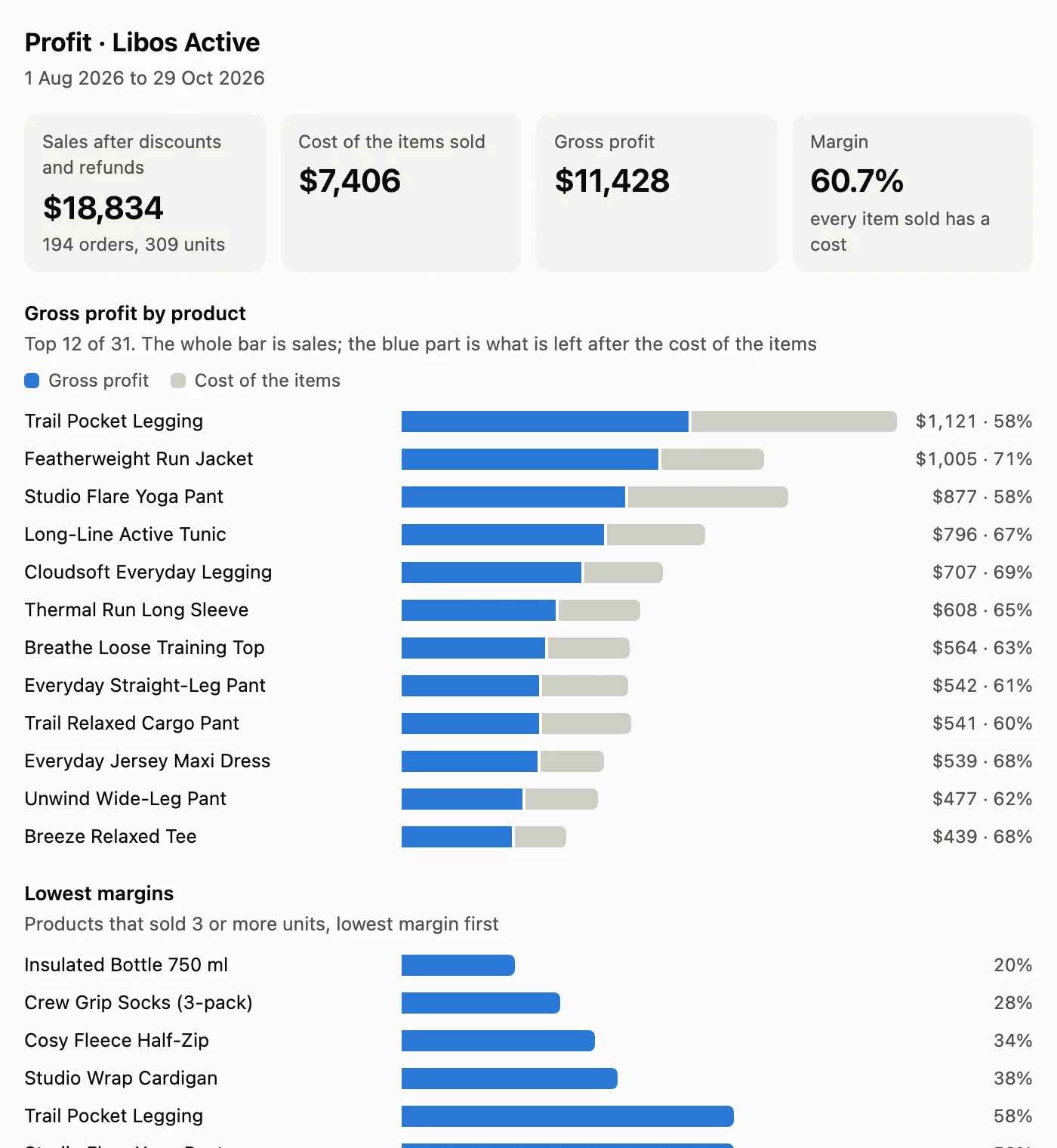
In the demo, the overall margin looks healthy at 60.7%. The interesting part is lower down: an insulated bottle earning 20% and a pack of socks at 28%. Those are the conversations worth having with a supplier, and you would not spot them in a revenue report.
2. "What needs my attention today?"
This is the question that turns an assistant from something you ask into something that tells you. The checks behind it are simple: a bestselling colour down to its last size, a day well under the usual for that weekday, Google clicks falling week on week, a competitor dropping prices. In the demo it flagged a black legging that had sold about 48 units in four weeks and had one size left. Our connector can also send the same checks as a short email each morning.
3. "Who are my best customers?"
Repeat customers are cheaper to keep than new ones are to find. A useful answer shows how many customers ordered twice or more, how long the second order usually takes, and which first purchase brings people back. In the demo, 59% of customers over six months came back, typically 48 days after their first order.
It should not show emails or phone numbers. Ours shows customers as first name and surname initial, like "Olivia P.", and only if the store owner chooses that, with a link to open the customer in Shopify itself.
4. "Where do my visitors come from?"
This one needs Google Analytics. Ask it by month and by channel, and ask separately about visits from AI assistants. ChatGPT, Claude, Perplexity and Gemini now send real visitors to shops, and most owners have no idea how many.
5. "How did Google search do over the last four weeks?"
From Search Console: clicks and impressions against the four weeks before, the searches that bring people in, and which ones are gaining or losing clicks. It is the earliest warning you get that a product page has dropped down Google.
How to tell whether an answer can be trusted
AI assistants are fluent, and fluency is not accuracy. Before you act on a number, check four things:
- Does it say where the figure came from and for which dates? Every answer from our connector carries its source and its date range, so you can check it against Shopify's own report.
- Does it say what it cannot see? If Google Analytics is not connected, the honest answer is "not connected", not an estimate.
- Is it clear what kind of profit it means? Profit on products, before shipping, payment fees and ads, is not the same as the profit on your accounts. A good answer says which one it is.
- Does it count the way Shopify counts? Test orders out, cancelled orders shown separately, sales on the date Shopify's own reports use.
If your setup fails any of these, the risk is not a wrong chart. It is a confident sentence that sends you in the wrong direction.
Keeping customer data out of the chat
Whatever an assistant reads ends up in your chat history with Claude or ChatGPT. That is a good reason to keep personal data out of it altogether. Counts, money and products are what you need for decisions; contact details belong in Shopify, where your customers agreed to leave them. It is also simpler to explain to a customer who asks.
Setting it up
For an owner connector, the store gives read-only access to Shopify and, if it wants those answers, to Google Analytics, Search Console and Klaviyo. Nothing involved can change the store. With us it takes about twenty minutes of the owner's time using a one-page guide, and the connector is live within two working days, after we have checked its figures against the store's own Shopify reports. Then you add it in Claude or ChatGPT and sign in.
You can see real answers, the charts and a 40-second demo on our page about Claude and ChatGPT connectors for Shopify. If you also want your customers to shop inside the chat, including trying clothes on a photo of themselves, the same page covers the shopping connector.