For online, weekend & supplementary schools

Student enrolment automation that runs the whole admissions week for you

From the first enquiry to a confirmed place, a paid invoice and a working login — without anyone in the office re-typing a single detail. LiveClass is the school platform we build and run at Ummah Design.

From £3 per pupil, a month EU servers in Germany 100% of fees stay yours
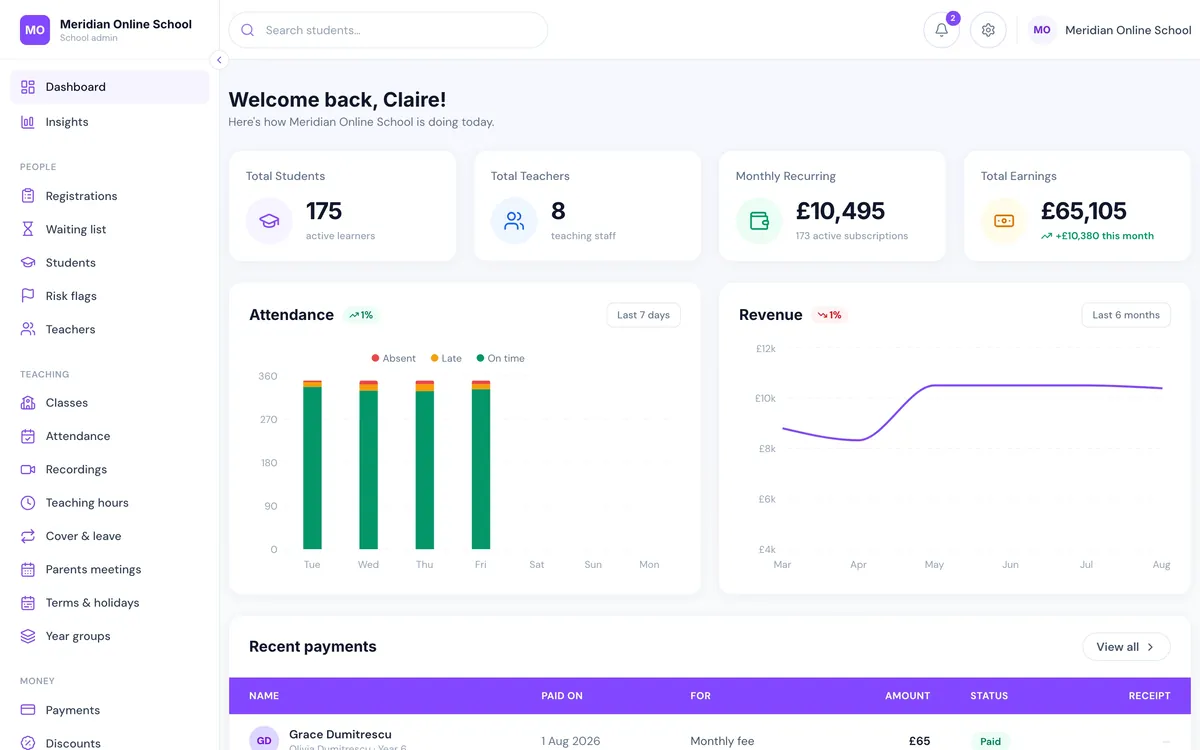
LiveClass school admin dashboard showing total students, monthly recurring revenue, attendance and recent payments
The admissions week

Enrolling a child takes eleven minutes. Doing it ninety times takes a fortnight.

Not because any single step is hard, but because none of them talk to each other.

The re-typing tax

The same family, entered five times

Once in the enquiry inbox. Again in the applications spreadsheet. Again in the fee tracker. Again in the class list. Again in whatever sends the welcome email. Every copy is a chance to mistype a year group or lose a sibling discount, and every copy has to be corrected separately when the family changes their phone number.

The offer clock

A waiting list nobody has time to work

A place frees up in Year 4. Somebody has to notice, find the list, work out whose turn it is, remember the sibling rule, email the family, wait, chase, and move on if they go quiet. In practice the place sits empty for three weeks — and an empty place is fee income you have already lost for that term.

The money

Chasing fees instead of teaching

Invoices raised by hand, discounts applied from memory, reminders sent when someone remembers to send them, and no clean answer to “who is overdue right now?” The school ends up with an unpaid debt-collection job it never wanted and a member of staff who does little else.

The compounding bit

Nothing gets more efficient with size

Fifty more pupils means proportionally more enquiries, more invoices, more registers and more chasing — so growth is paid for with another pair of hands rather than better margins. The work grows exactly as fast as the school does, which is the one thing a school cannot afford.

Definition

What student enrolment automation actually means

Student enrolment automation — or student enrollment automation, if you spell it the American way — is software that carries a family from first enquiry to a confirmed, paid place without staff re-entering the same details at each step. The enquiry creates the record; the record drives the offer, the payment, the class place and the login.

The test is not whether you have online forms. Plenty of schools have forms and still spend a fortnight on admissions, because the form only produces an email and a human does the other seven steps. Real automation means each stage hands off to the next by itself, and the office is left handling the exceptions — the appeal, the unusual sibling arrangement, the family who needs a payment plan — which is the part that actually needs a person.

Enquiry captured Application recorded Waiting list ordered Offer sent & timed Place confirmed Fees invoiced Discounts applied Account created Conversion measured

Nine stages. In most schools, nine separate jobs across a spreadsheet, an inbox, a payment provider and a group chat. On LiveClass, one record moving through one system — which is why the ninetieth child costs the office roughly what the first one did.

Stage by stage

How enrolment runs on LiveClass

Every screenshot below is the real product, not a mockup — taken from a live demo school of 175 pupils.

01 · Enquiry

The enquiry lands as a record, not an email

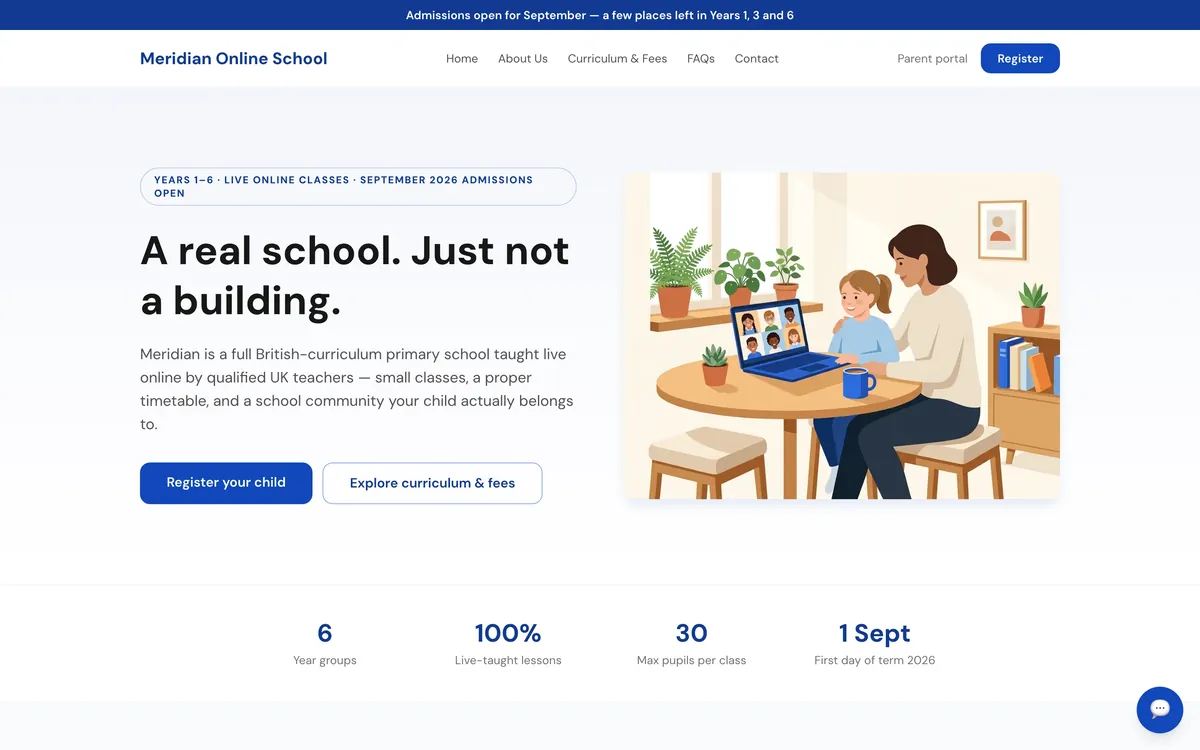
Your admissions pages, prospectus copy, fees and FAQs live in the same system as the enrolment engine, and the office edits them without ringing an agency. A parent who reads the curriculum page and clicks Register your child never leaves the system, so the enquiry arrives already attached to a year group, a family and a date — instead of as a message in an inbox somebody has to remember to action.

  • Public admissions site the office edits itself, at your own domain
  • Or keep your existing website and run LiveClass on a subdomain — one DNS record and two buttons
  • Enquiry, application and prospectus request all captured against the family record
Public admissions website for an online school with a Register your child call to action and September admissions banner
02 · Waiting list

The waiting list offers places by itself

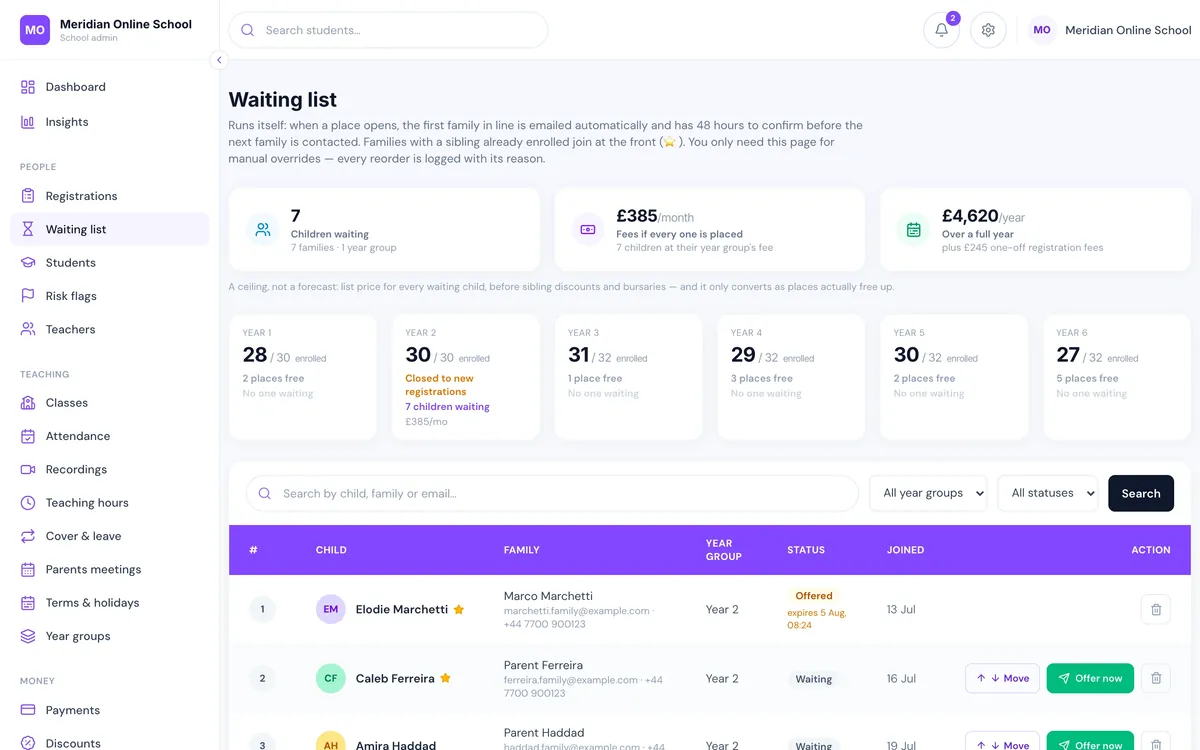
When a place frees up in a year group, the first family in line is emailed automatically and has 48 hours to confirm before the next family is contacted. Families with a sibling already enrolled join at the front. The office only opens the page to override the order — and every reorder is logged with its reason, which is exactly what you want when a parent asks why another child went first.

  • Timed offers that expire and roll to the next family with no human involvement
  • Sibling priority applied automatically
  • Live capacity per year group — enrolled, places free, children waiting
  • Every manual override recorded with a reason
Waiting list screen showing children waiting, capacity per year group, timed offers with expiry and sibling priority markers
03 · Fees

The accepted place becomes a paying subscription

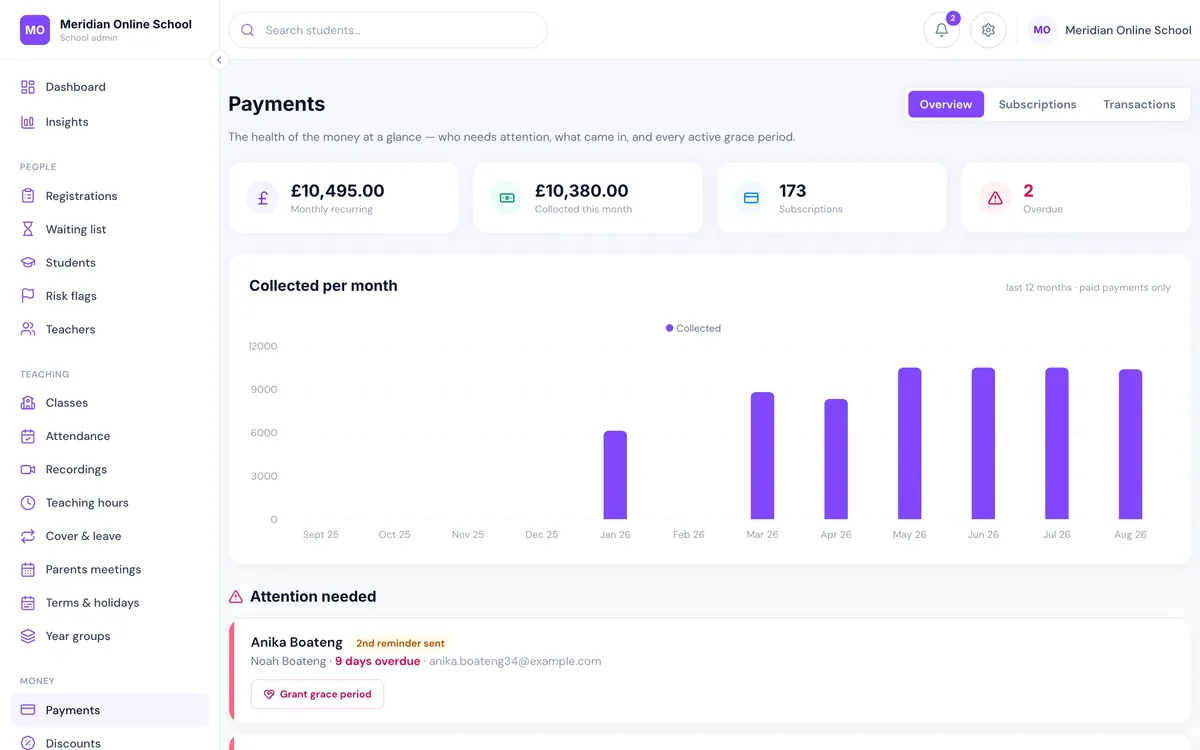
Confirming a family turns the place into money without a second system. A monthly fee subscription opens on the school's own payment account, invoices go out on schedule, and overdue balances escalate through reminders rather than sitting on a to-do list. Class access is tied to the fee position, so a family that pays at 11pm has access back at 11pm — no one waits for the office to open.

  • Automatic monthly invoicing and card collection
  • Escalating overdue chasing, not a single hopeful reminder
  • Access linked to payment, with a head teacher override that records its reason
  • Reconciliation as it happens — you always know what came in
Payments dashboard showing monthly recurring revenue, amount collected this month, overdue families and an attention-needed queue
04 · Discounts

Sibling and bursary discounts apply themselves

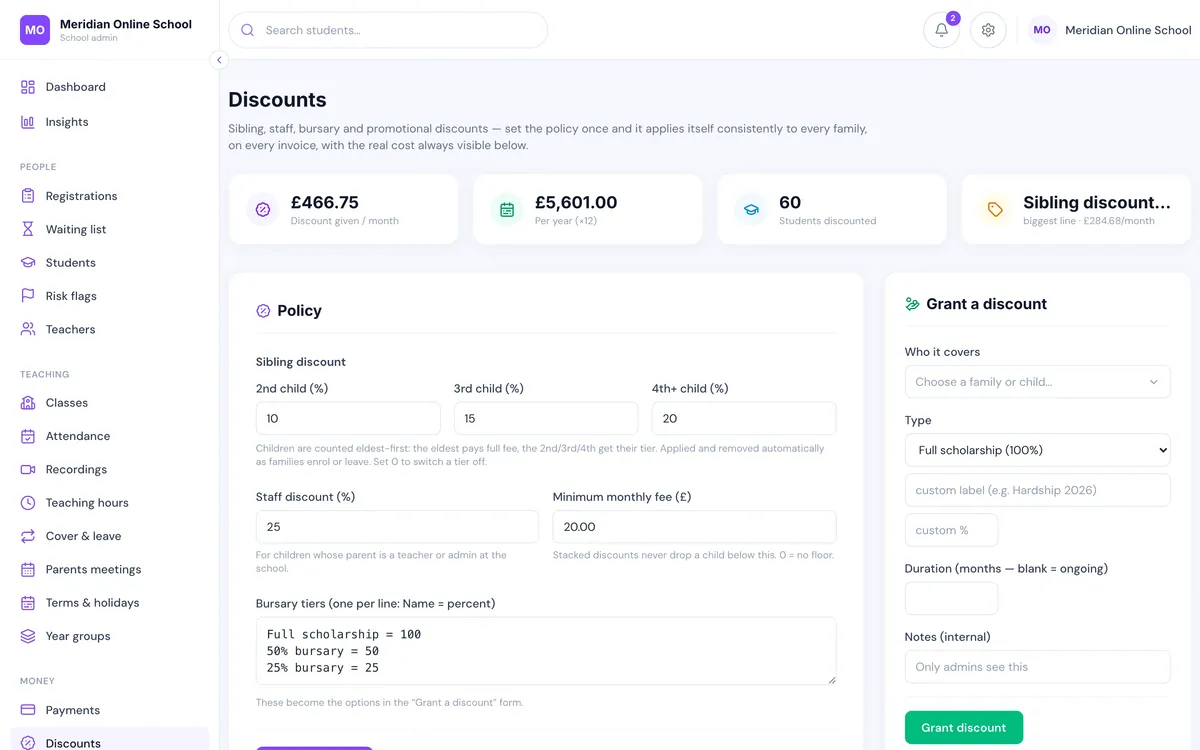
The second and third child in a family, staff children, scholarship and hardship places — the arithmetic that quietly eats an admissions week is a rule you set once. Discounts apply at invoice time for every family that qualifies, in the same way, every month, with no one editing invoices by hand and no one forgetting the family that was granted a reduction last September.

  • Sibling, staff and bursary discounts applied by rule
  • Consistent across every family and every month
  • No hand-edited invoices and no forgotten arrangements
Discounts configuration screen showing sibling, staff and bursary discount rules for an online school
05 · Day one

The login, timetable and class place already exist

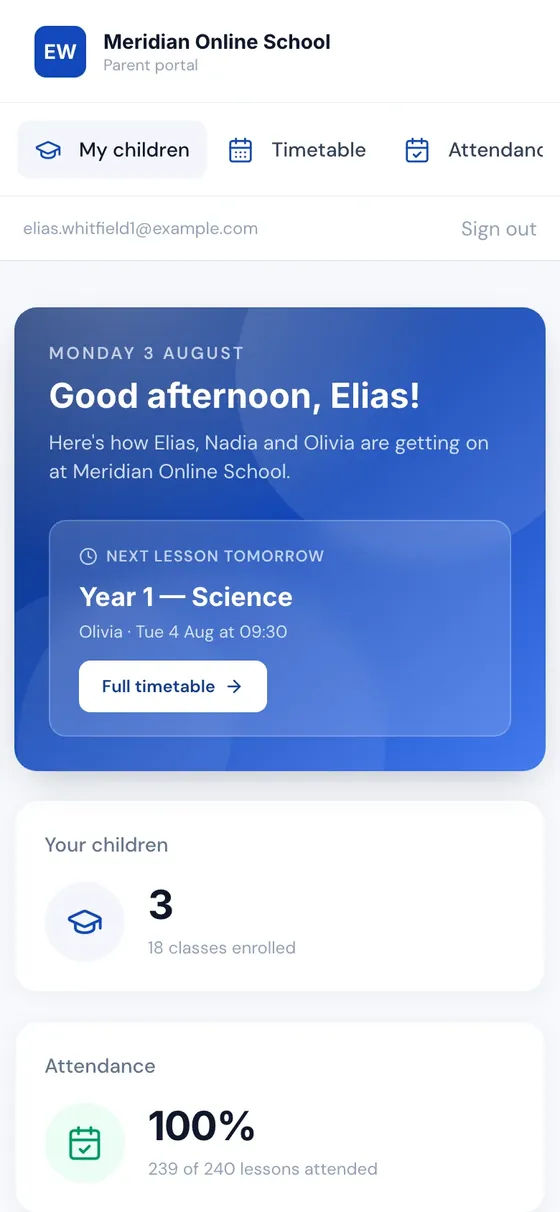
The moment a place is confirmed, the pupil has a timetable, a class, a personal join link and a portal; the parent has one login covering every one of their children. Nobody builds a welcome pack by hand, and nobody discovers on the first morning that a child was enrolled but never added to a class.

  • Pupil account, timetable and class membership created from the enrolment record
  • One parent login for all of a family's children
  • Personal per-pupil join link — siblings counted separately in the register
  • Add to home screen for your school's icon and real push notifications
Parent portal on a mobile phone showing all children, next lesson, attendance percentage and a full timetable button
06 · Measurement

You can finally see where enrolment leaks

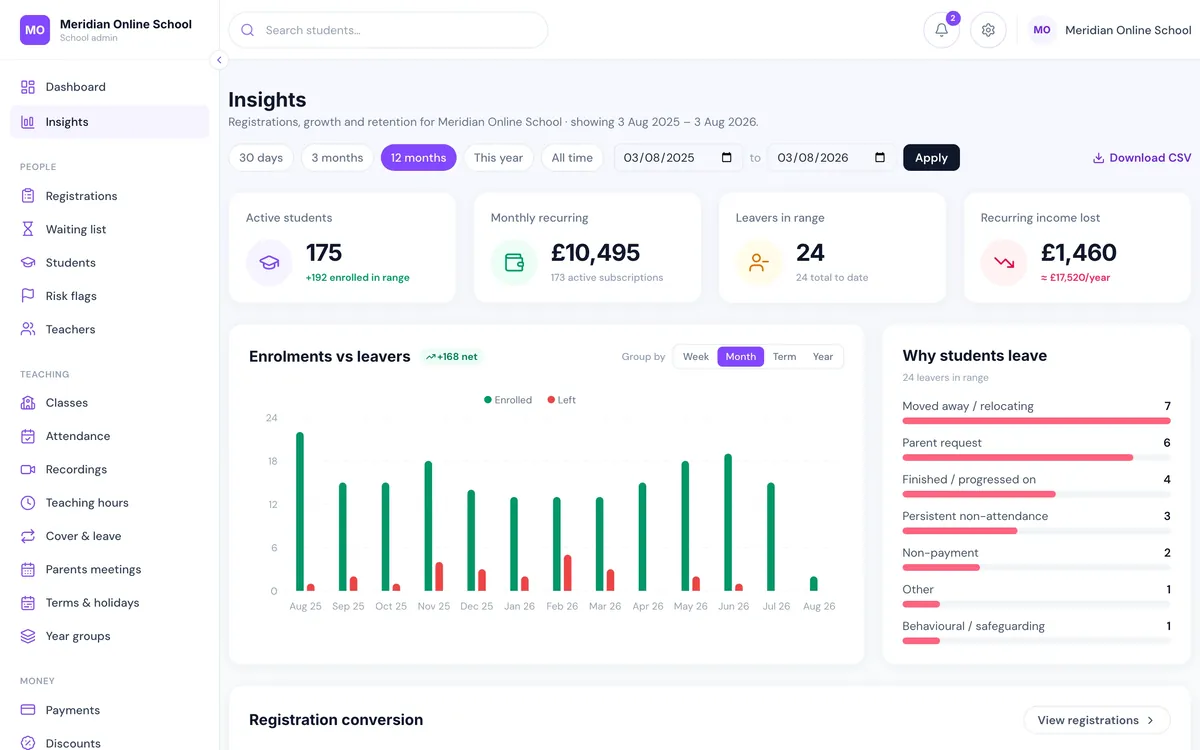
Registration conversion, enrolments against leavers month by month, roster and revenue by year group, and grouped reasons families gave for leaving. Most schools have never seen their own admissions funnel — how many enquiries became applications, how many applications became paying pupils, and which year group quietly lost four families in February.

  • Registration conversion from enquiry through to enrolled
  • Enrolments vs leavers, grouped by month, term or year
  • Why students leave — captured at deregistration, not guessed at afterwards
  • Recurring income won and lost, with full CSV export
Insights dashboard showing active students, monthly recurring revenue, enrolments versus leavers chart and reasons students leave
After the first week

Enrolment is the first week. The other thirty-eight also automate.

An enrolment tool that hands you back to spreadsheets in September has solved the smaller half of the problem.

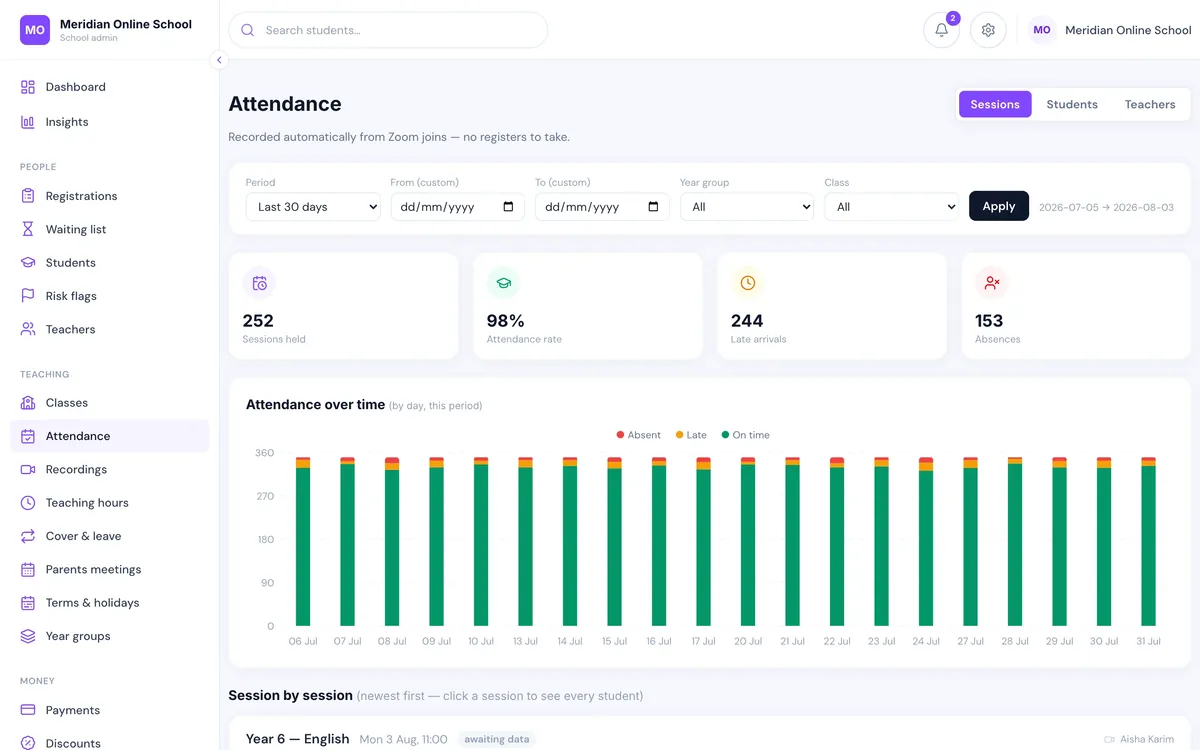
Attendance screen showing per-pupil attendance rates and minutes attended captured from live lessons

Registers take themselves

Attendance comes back from the live lesson as minutes actually attended per child — not a present-or-absent tick. A pupil who appears for four minutes is not recorded like one who stayed the hour. Parents get an absence email the next morning; leadership gets a Monday summary.

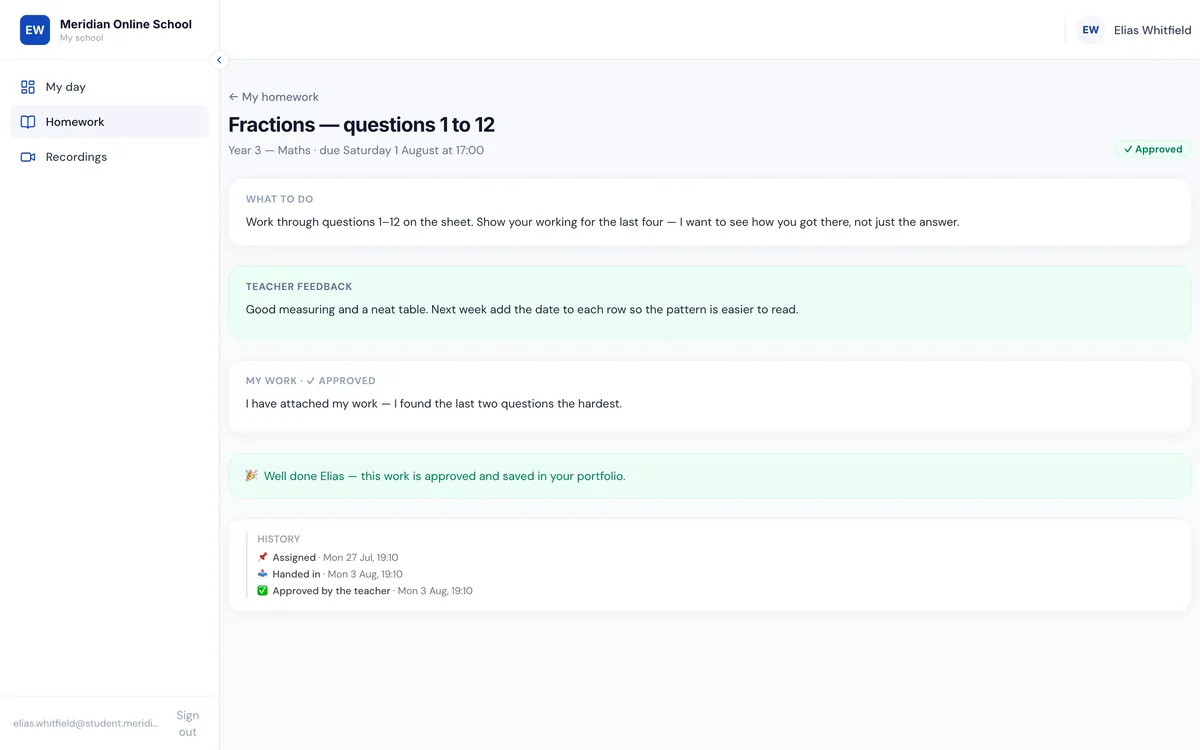
Student homework screen showing assignments, submission formats and teacher marking

Homework, set and marked in one place

Typed answers, photos, PDFs or recorded answers, plus worksheets pupils write on and teachers mark over in the browser. Approved work goes to the pupil's portfolio; class posts wait for a teacher before anyone else sees them.

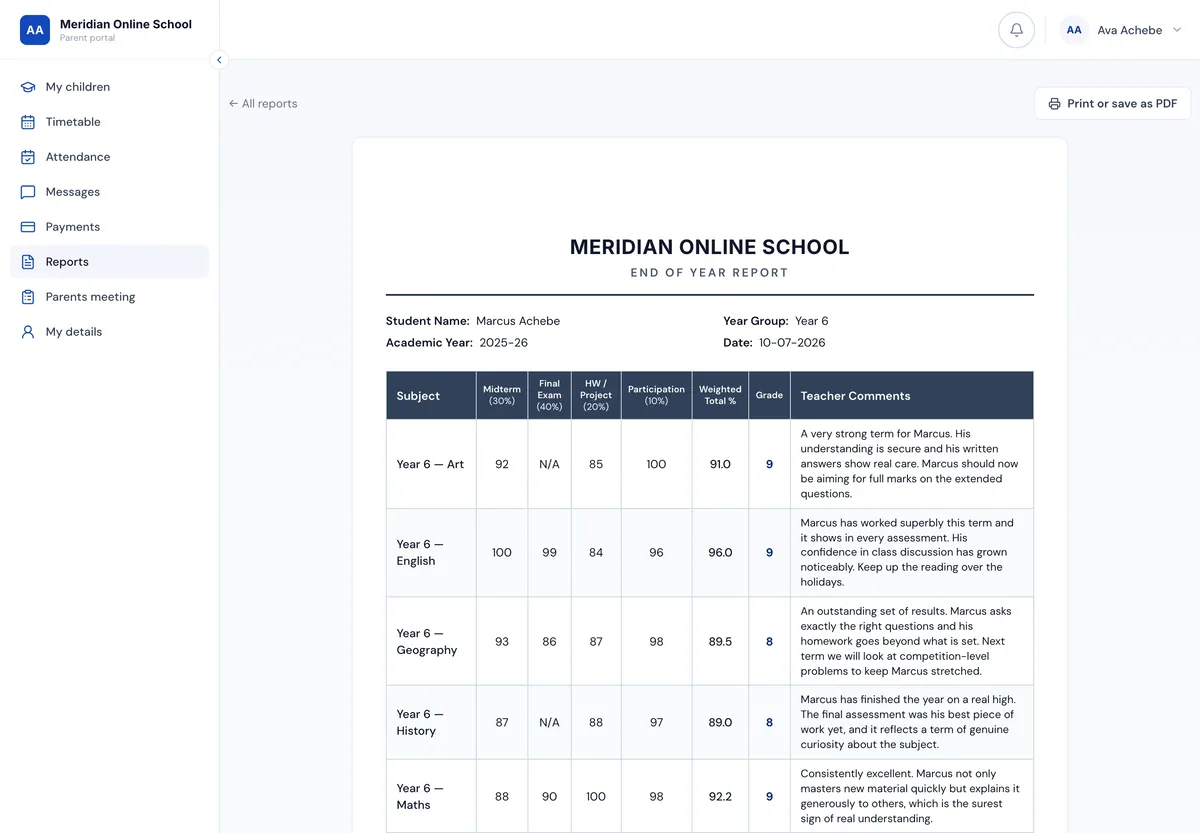
Termly report card with subject grades, attendance summary and teacher comments

Reports without the spreadsheet fortnight

A markbook grid per class that autosaves, AI-drafted comments written from the pupil's real term that a teacher edits and approves, and missing assessments reweighted rather than counted as zero. Grades are never AI-generated. Published reports are a snapshot, kept forever.

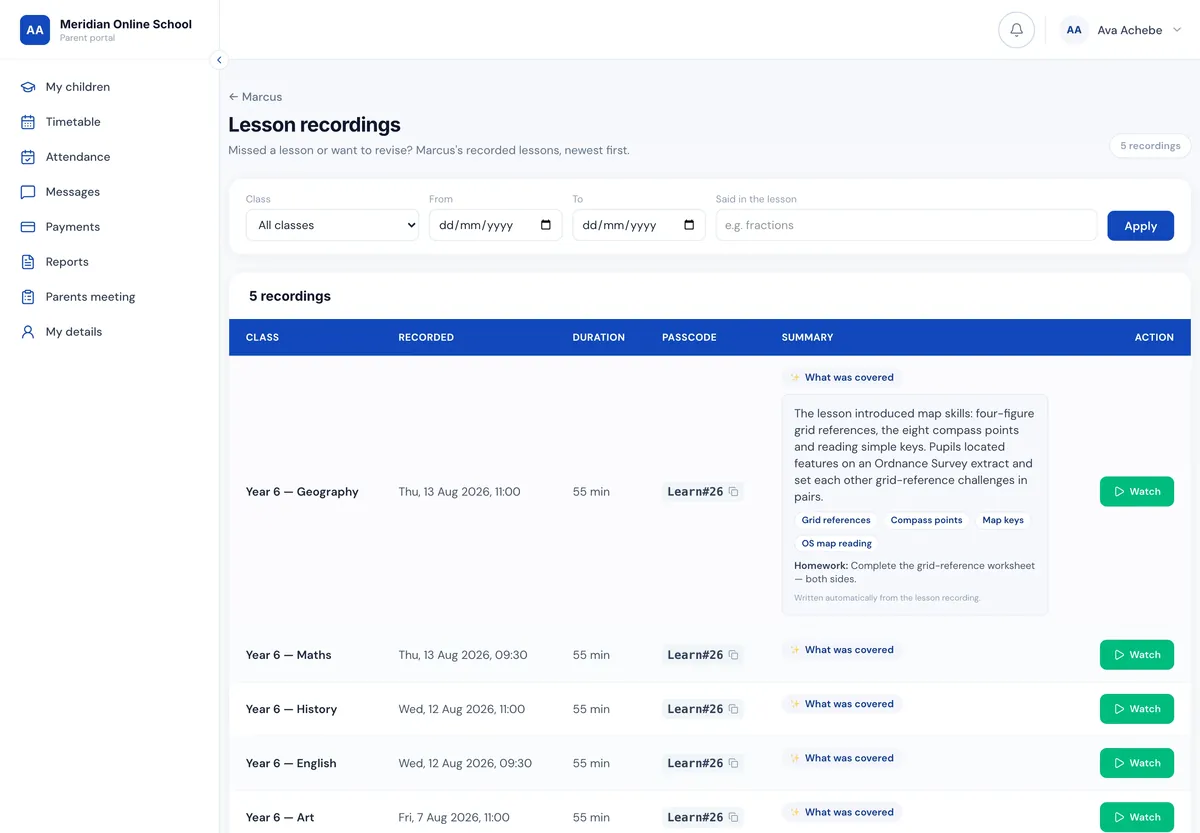
Lesson recordings screen with AI-generated summaries, topics covered and homework set

Every recording, summarised and searchable

What was covered, the topics touched and the homework set — attached to the recording. Search recordings by what was actually said in the lesson. A child who missed Tuesday gets the summary in the next morning's absence email.

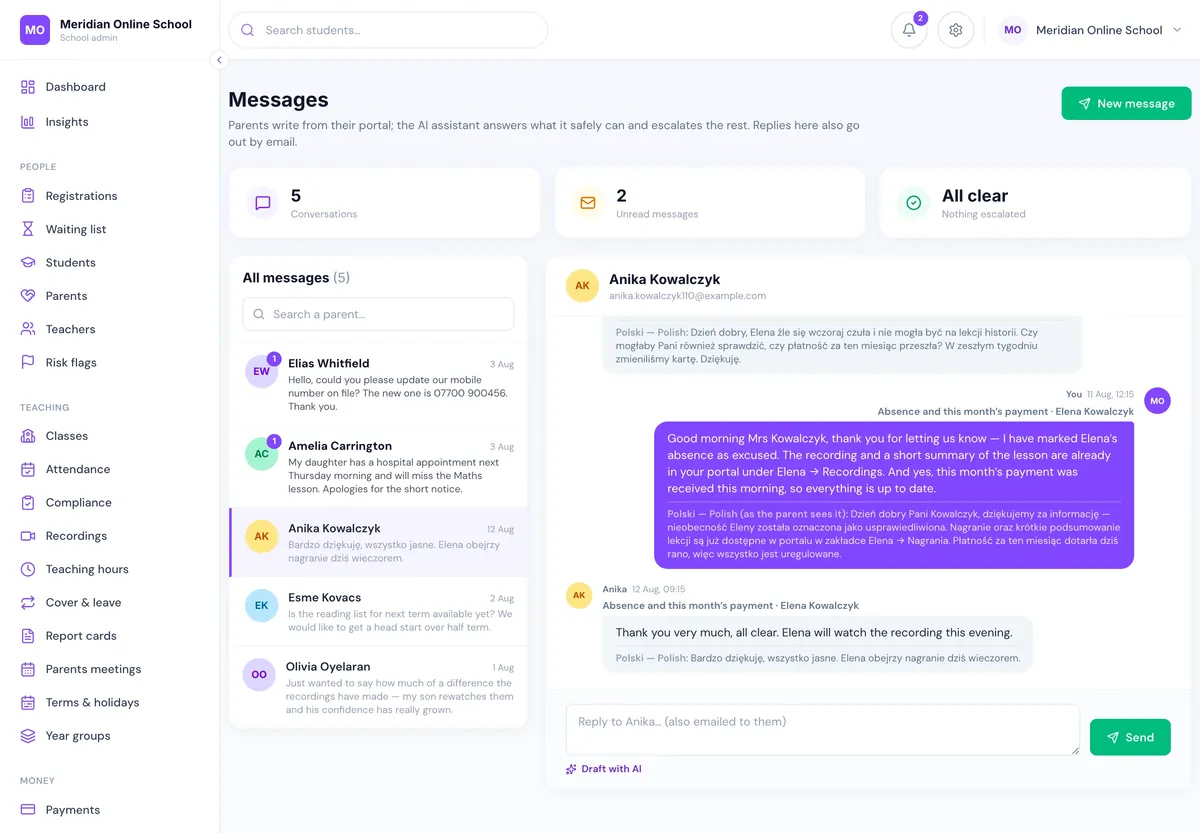
Office messages screen showing a parent message translated into English with a translated reply

Parents write in their own language

Messages arrive in the office in English and the reply goes back in the parent's language, across twelve languages. The school stops losing families who simply could not ask a question comfortably.

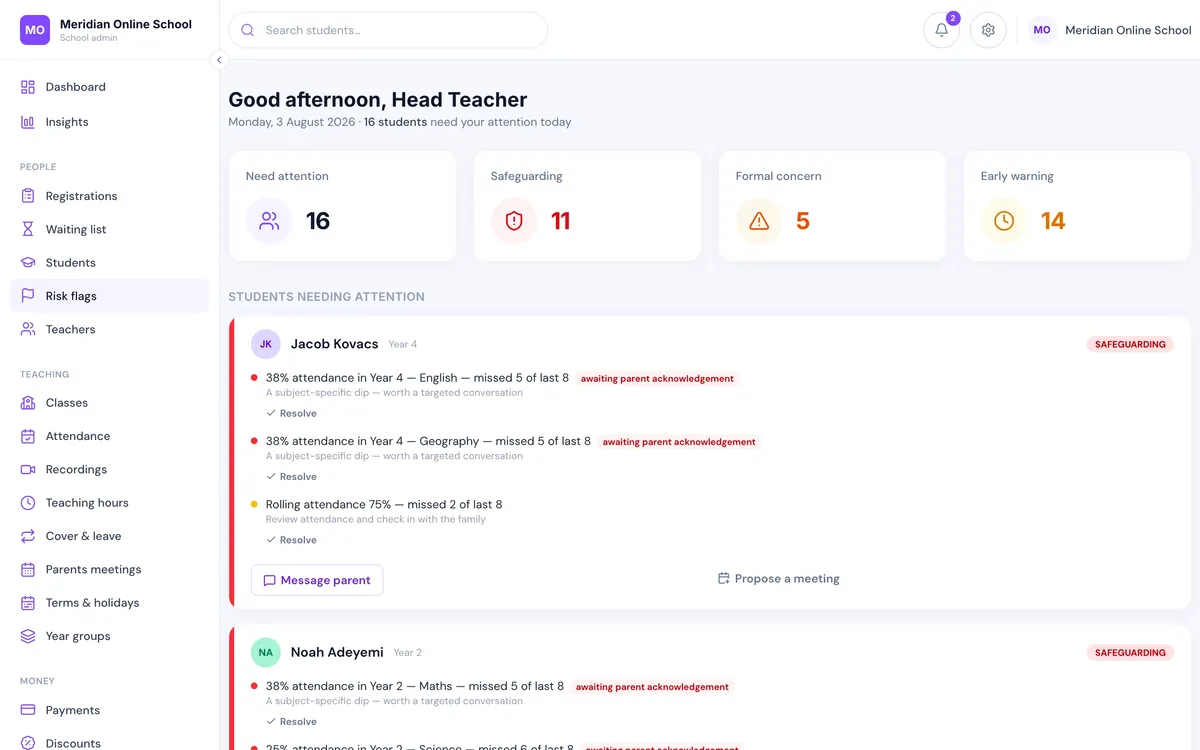
Risk flags screen listing pupils needing attention with the attendance, payment and homework signals behind each flag

The pupils to look at today, and why

A daily pastoral list scored across attendance, payment, homework and messages together — which catches the child sitting at 88% overall but 25% in one subject, the pattern a single-signal report never surfaces.

Parents meetings screen showing bookable slots against teacher availability

Parents' evening books itself

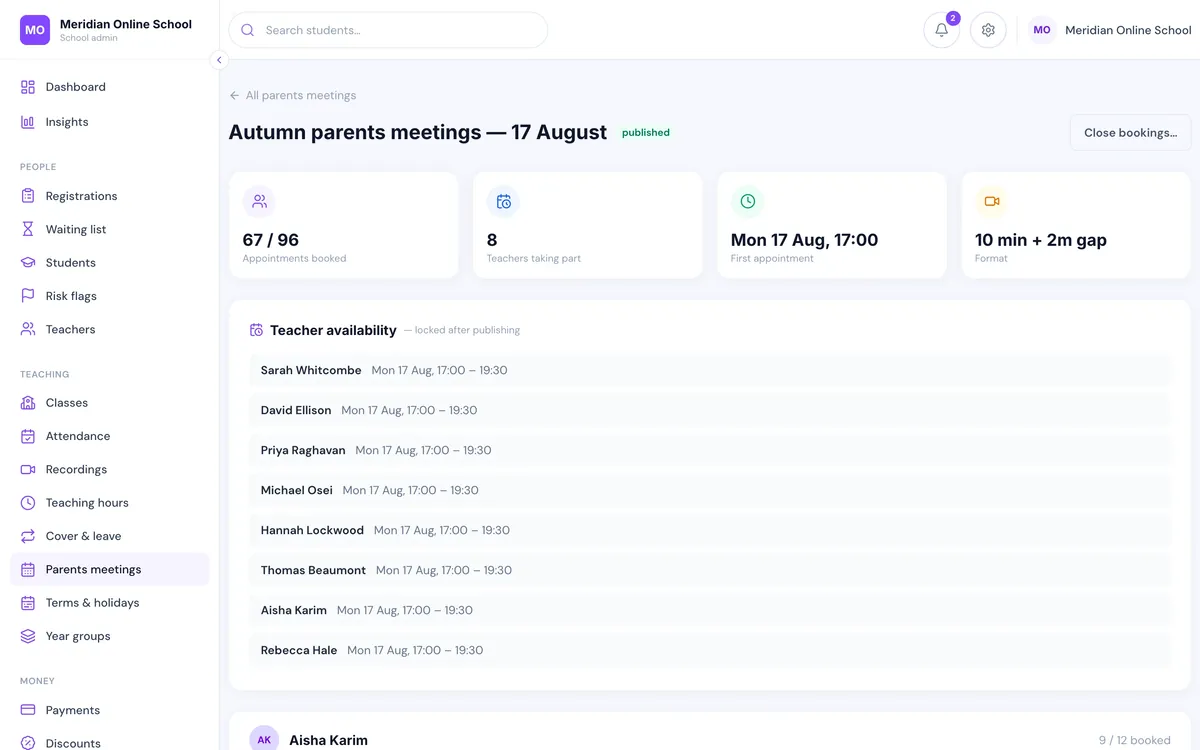
Parents pick a slot against real teacher availability, the Zoom room is created for it and the reminders send themselves. No spreadsheet, no phone tag, no booking add-on to subscribe to.

Teacher portal showing today's classes, registers and cover requests

Teachers get a portal, payroll gets numbers

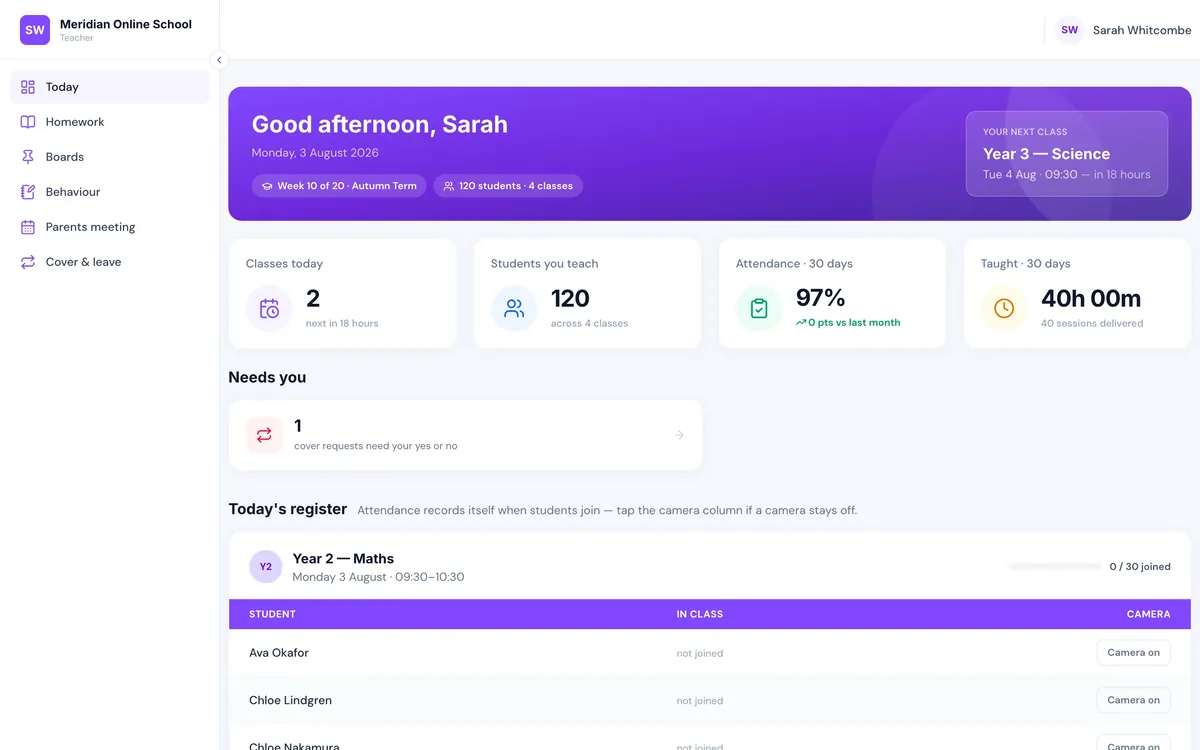
Today's classes and registers for teachers; cover offered to eligible staff with the first to accept taking the class and the meeting host reassigned automatically. Teaching and cover hours export for payroll instead of being re-keyed.

Before and after

The same admissions week, run two ways

The job Forms, spreadsheets & an inbox Enrolment automation
New enquiry arrivesEmail someone must actionFamily record, attached to a year group
Place frees up in a year groupSomebody notices, eventuallyNext family emailed automatically
Sibling priorityRemembered, or notApplied by rule, override logged
Offer expiryChased by hand48-hour clock, rolls on by itself
First invoiceRaised manually after the factSubscription opens on confirmation
Sibling & bursary discountsHand-edited on each invoiceRule applied every month, consistently
Overdue feesOne hopeful reminderEscalating chase, access tied to payment
Pupil login & class placeCreated by hand, sometimes forgottenExists the moment the place is confirmed
Lesson accessZoom link pasted into a group chatPersonal join link, window enforced server-side
RegisterTeacher ticks namesMinutes attended, captured from the lesson
Admissions conversion rateNobody knowsEnquiry → application → enrolled, on a chart
Cost of the next fifty pupilsAnother pair of handsAbout £2.50 a head
Who it’s for

Schools that teach live, and enrol continuously

If pupils join through the year rather than once each September, manual admissions never gets a quiet week.

🎓

Online primary & secondary schools

Full timetables taught live, families in several time zones, and a roster that changes every month rather than every September.

🕌

Weekend & supplementary schools

Madrasahs, community and faith schools running Saturdays with hundreds of pupils and a fraction of the office hours to administer them.

🗣️

Language academies

Rolling intakes, levels rather than year groups, and parents who often want to correspond in their own language.

📚

Tutoring companies

Small groups, per-subject enrolment and fee collection that has to work without a finance department behind it.

🌍

Schools with international families

Twelve-language parent messaging, and fee reminders that reach a parent who does not read English comfortably.

📈

Schools that grew past their spreadsheet

The setup that worked at 60 pupils and quietly stopped working somewhere around 150, without anyone deciding when.

Safeguarding & data

Children’s data, held the way a governing body would want

Every question your DPO is going to ask, answered before they ask it.

Encrypted and hashed

Zoom credentials encrypted at rest with AES-256-GCM and decrypted only in memory. Passwords bcrypt-hashed. Two-factor authentication available, and head teachers can mandate it.

A safeguarding trail

Concerns are recorded, not just felt: who raised a flag, who resolved it, and when. Attendance flags can require a parent to acknowledge them.

Least privilege by role

Eight staff role types with granular permissions. Revenue goes to the owner, pay and policy to the head, and pupils see only their own day, work and recordings.

Backed up nightly

Rolling-window retention, so a bad afternoon is recoverable. Genuinely sensitive documents are held outside the web root and released only to signed-in staff.

Paperwork that exists

A written data processing agreement, a privacy policy and published terms — ready for a DPO or governing body to review rather than promised for later.

Built by the people who run it

Ummah Design builds, hosts and supports the platform. It grew out of running a real online school with several hundred pupils, not out of a product workshop.

Pricing

One fee for the school. You keep every penny of your own.

Priced on your roster, not on how many people log in.

Starting from

£3per pupil, per month

And the rate per pupil falls as your roster grows. We work out your exact monthly figure on the demo, using your real pupil count — no obligation, and we’ll tell you honestly if it isn’t a fit.

  • Every feature included — no per-parent, per-teacher or per-login charges
  • Replaces the noticeboard, homework, forms, website, mailing and parents’-evening booking subscriptions
  • Parents pay into your payment account — we never sit between your school and families’ money
  • One-off setup fee covering migration, data checking and staff training
  • Twelve-month initial term, then rolling. No lock-in beyond the first year
Get your figure on a demo
Getting there

We move you across — you don’t

Weeks, not terms. And you do not have to move everything at once.

Demo with your numbers

Thirty minutes on live data, not a slide deck. We use your pupil count and fee structure so the pricing conversation happens on the call, and we tell you honestly if it isn’t a fit.

Migration & checking

We bring across pupils, families, classes and fee arrangements from whatever you have now — spreadsheets included — and check the result with you before anyone relies on it.

Staff training

Office, teachers and leadership, each trained on the part they actually use. Included in the setup fee rather than sold as a package afterwards.

Start where it hurts

Most schools begin with admissions and fees, then bring attendance, homework and reports across at the next term boundary. Running your new intake on LiveClass while the current roster finishes the term is a perfectly normal start.

FAQ

Questions schools actually ask

What is student enrolment automation?

Student enrolment automation is software that carries a family from first enquiry to a confirmed, paid place without anyone in the office re-typing the same details. The enquiry form creates a record, the waiting list offers places in order, the offer collects the registration fee, the accepted place opens a fee subscription, and the pupil's login, timetable and class access are created from the same record. The office handles exceptions instead of doing data entry.

How is that different from an online form or a school CRM?

A form gives you an email. A CRM gives you a pipeline you still have to action by hand. Enrolment automation closes the loop: the application, the offer clock, the payment, the discount rule, the class place and the parent login are one record, so confirming a family is a single action rather than eight tasks across five tools.

Do we have to move everything at once?

No. Most schools start with admissions and fees, then bring attendance, homework and reports across at the next term boundary. Running the new intake through LiveClass while the current roster finishes the term on your existing setup is a normal way to start.

How long does it take to go live?

Weeks, not terms. The platform is already built — we configure it for your school, migrate your pupils, families and classes, check the data with you and train your staff. The one-off setup fee is quoted on the volume of data being moved.

What happens to the fees we already collect?

You keep 100% of them. Parents pay through your school's own payment account, so the money never passes through us. Card processing fees go to the payment provider exactly as they do now.

Do we need to change our video platform?

No. LiveClass works with Zoom. Each class gets one meeting created for it, each pupil gets a personal join link, and attendance comes back from the meeting data automatically — nobody pastes a link into a group chat again.

Is our pupils' data safe, and where does it live?

On our own servers in Germany, inside the EU, on hardware we run — not an account with a US cloud provider. Each school's data is isolated, Zoom credentials are encrypted at rest with AES-256-GCM, passwords are bcrypt-hashed, two-factor authentication is available for staff and head teachers can make it mandatory. Everything is backed up nightly, and there is a written data processing agreement your DPO or governing body can review.

Does it work for weekend, supplementary and faith schools?

Yes — those are among the schools it was built for, alongside online primary and secondary schools, language academies and tutoring companies. A Saturday-only madrasah with 300 pupils has exactly the enrolment, fee-chasing and register problems a five-day online school has, usually with fewer office hours to solve them in.

Can it handle how our school actually works?

Discounts, year groups, term dates, absence rules, staff permissions and fee structures are all configuration, not code. Sibling, staff and bursary discounts are applied by rule. If something genuinely doesn't fit, tell us on the demo — we built the platform and we can extend it.

Do parents have to install an app?

No. The parent portal opens in the phone's browser. Adding it to the home screen takes two taps, gives your school's icon on the phone, and enables real push notifications for absences, payment problems and meeting reminders — with no App Store, no Play Store and nothing for families to update.

What does it cost?

Pricing starts from £3 per pupil, per month, and the rate per pupil falls as your roster grows. One fee covers the whole school: no per-parent, per-teacher or per-login charges. There is a one-off setup fee for migration, data checking and staff training, a twelve-month initial term and no lock-in after that. We work out your exact monthly figure on the demo, against your real pupil count, so you get a straight answer rather than a range.

What happens to our data if we leave?

You get a full export in an open format on request, at any point — including on the way out. No exit fee and nothing held hostage.

Who builds and supports it?

Ummah Design, a UK web and software studio. LiveClass grew out of building this exact system for a real online school with several hundred pupils, so the workflows come from an office that had to run them daily.

Book a demo

See your own admissions week, automated

Thirty minutes, on live data, with pricing for your roster included — and an honest answer about fit. Tell us your pupil count and what you use today.

What you’re interested in