
The trustee connector lets your trustees ask Claude or ChatGPT about your charity's fundraising in plain words, "how much did we raise this week?", and get the answer from your own records, with a chart. It is read only. Trustees sign in with a 6-digit code sent to their email, only your admins and the trustees you name can use it, donors appear as first name and surname initial ("Sara M."), and every question is logged where your charity can see it.
It's an add-on to our fundraising system for charities and mosques, switched on per charity by us. Here's what it does, how a trustee sets it up, and what it can never see.
Read the video transcript
Trustee: How many donations did we get last month? Give me a breakdown.
Claude: In October you received 41 donations, £5,290 in all. Card was the biggest share.
Trustee: And how's the Winter Appeal doing?
Claude: It has raised £21,332 of £25,000. That's 85%, with the deadline on 21 December.
Trustee: Brilliant. Make a chart and save it as a Gmail draft to the trustees.
Claude: Done. The draft is waiting in Gmail. Nothing is sent until you press Send.
Trustee: Your charity's figures, one question away. Book a demo at ummahdesign.com.
What is a connector, in plain words?
Claude and ChatGPT can't see your charity's records on their own. A connector is a small, secure link that gives them a short list of questions they're allowed to ask your system, and nothing else. It's built on an open standard called MCP (Model Context Protocol), which is why the same connector works in both Claude and ChatGPT.
If you'd like the longer version, we've written a plain-English guide to MCP connectors, and our MCP connectors page shows the ones we build for other kinds of business.
What can trustees ask?
Anything about the money coming in, in their own words. The connector gives the assistant twelve read-only questions it can ask your records, and the assistant picks the right one. Between them they cover:
- Money raised: this week, last week, this month and this financial year, with the last twelve weeks week by week.
- Breakdowns: any period split by card, bank transfer, cash, cheque and events, and by appeal, month by month.
- Appeals: each appeal against its goal and deadline, what is still promised in pledges, and whether the last four weeks' pace will reach the goal in time.
- Gift Aid: how much you can claim from HMRC this tax year and last, month by month.
- Pledges: instalments past their due date, oldest first.
- Monthly donors: how many there are, what they give a month, and who started or stopped in the last 30 days.
- Recent donations: the latest donations, newest first, with names shortened.
- Everything else you run: giving windows such as the last ten nights of Ramadan, supporters' fundraising pages and teams, the sponsor-a-brick building appeal, and child sponsorship totals (figures only, no child or sponsor named).
Here's what an answer looks like, using our demo charity's made-up figures.
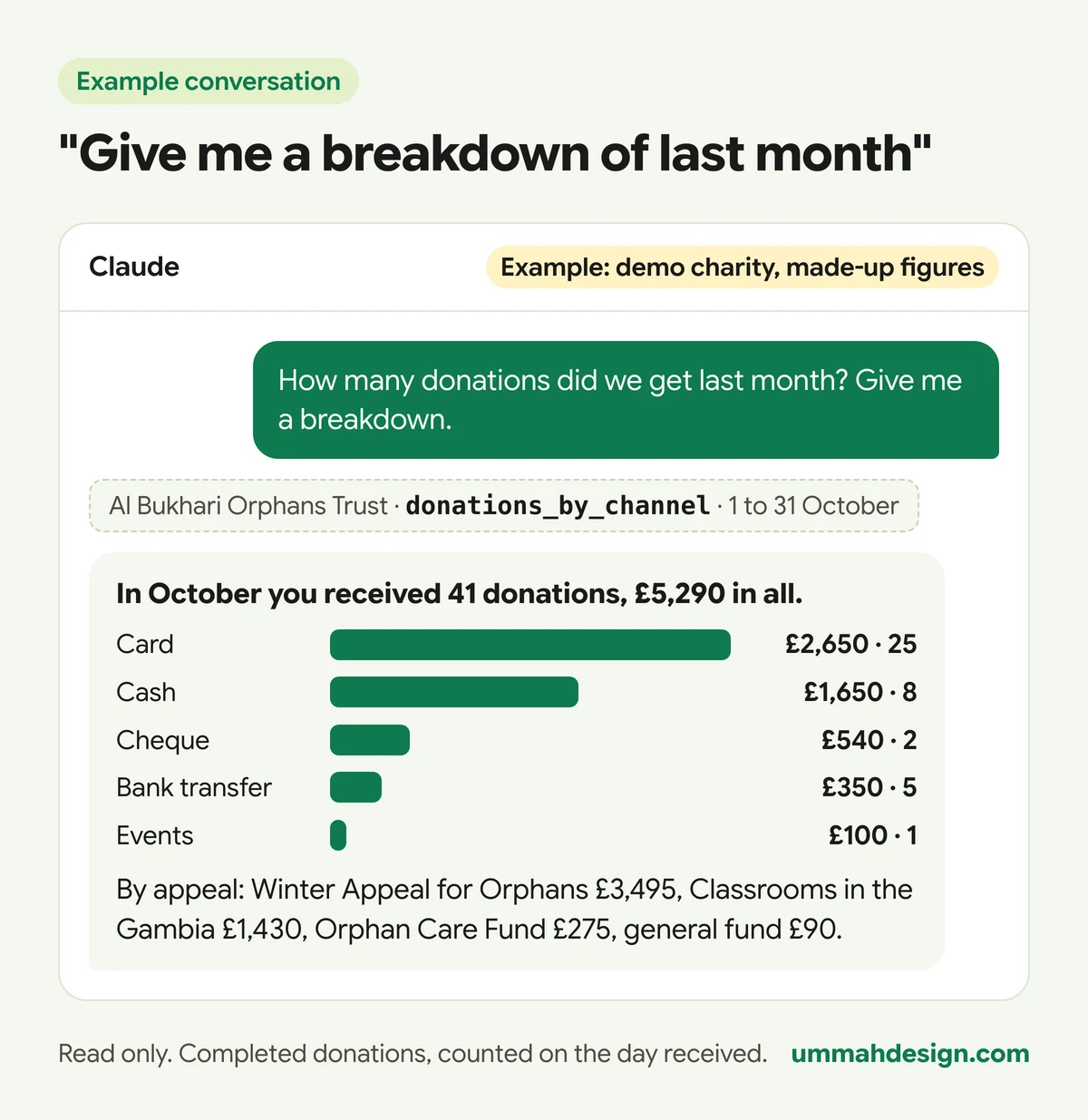
Every answer comes with a report card of the key figures and charts, and it says which days it covers and the rules it applied. Follow-up questions work the way you'd expect: "and how does that compare with September?", "which appeal is furthest behind?", "how much Gift Aid is that?".
Why is this useful for trustees on the go?
Picture the evening of a committee meeting. The chair is on the bus at half six and wants to know whether the winter appeal is on track. Normally that means messaging the treasurer, who is at work, and waiting for a spreadsheet that arrives at five to seven.
With the connector, the chair opens Claude or ChatGPT on their phone and asks. The answer comes from the same records the website uses, as they are right now. No login to the admin, no waiting for a report, and nobody has to export anything.
If you send the weekly trustee email, it still arrives every Monday morning with what came in, the Gift Aid to claim and whether each appeal is on track. The connector is for the questions in between.
How does a question travel, and who checks it?
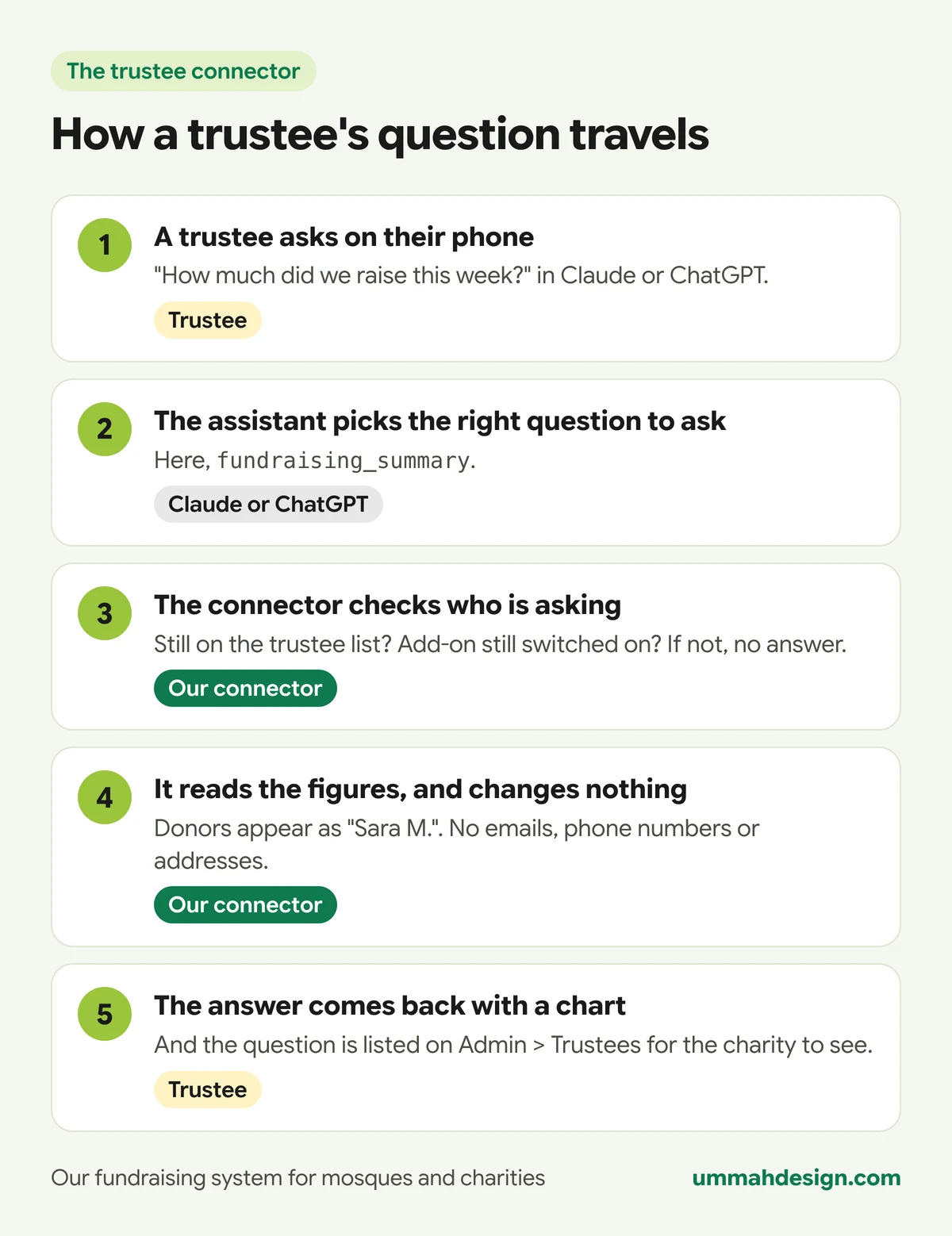
The check in step three happens at sign-in, every time the sign-in is renewed, and on every single question. So if you remove someone from the trustee list, or the add-on is switched off, they're locked out at once, not at the end of the month.
How does a trustee set it up?
Once we've switched the add-on on, your admin opens Admin > Trustees. That page shows the connector's address, the list of trustees who may sign in, and the latest questions asked. Add each trustee's email address to the list.
Each trustee then does this once:
- In Claude: open Connectors in the settings, choose to add a custom connector, give it a name and paste your charity's connector address. In ChatGPT: on the web, open Settings, then Apps and connectors, then Create, and paste the address.
- A sign-in page opens. The trustee types their email address.
- A 6-digit code arrives by email. It works for 10 minutes, with 5 tries. They type it in and allow access.
That's it. From then on they just ask. An email address that isn't on the list sees the same page but never gets a code, so the page doesn't reveal who your trustees are.
Which Claude and ChatGPT plans can use it?
As of November 2026, Claude allows custom connectors on every plan, including Free (Free accounts can add one custom connector). On Team and Enterprise plans, an Owner adds the connector for the organisation and each member then signs in with their own account. In ChatGPT, adding your own connector is a beta feature for paid plans, set up on the web, and the details have changed more than once this year, so check OpenAI's help pages for your plan. Your trustees use their own accounts, so each sign-in is personal.
Can the connector see our donors' personal details?
No. This is the part we built most carefully, and it doesn't rely on the AI behaving well.
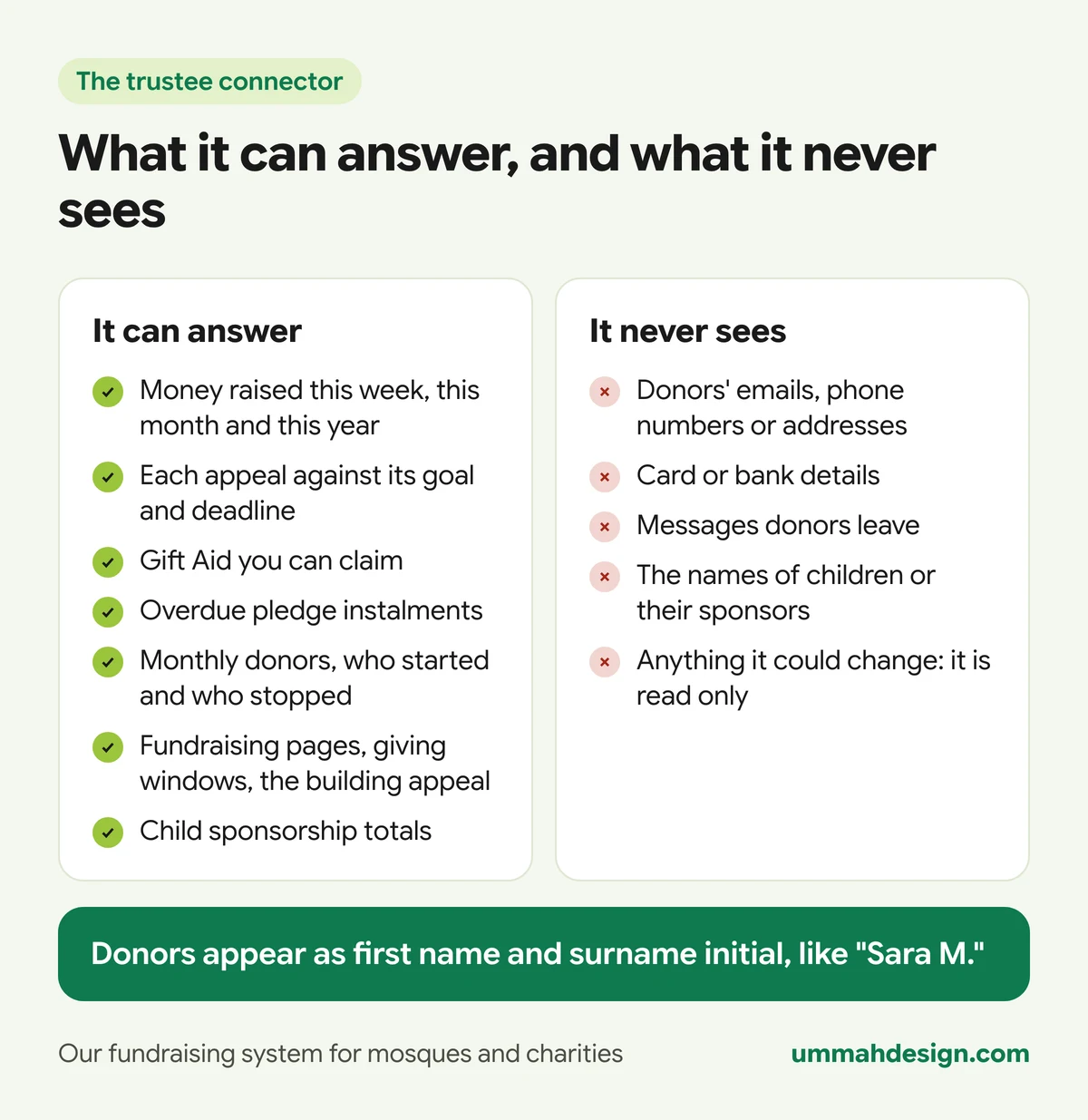
- Read only, in the database itself. The connector has its own database login that can only read a set of prepared views. It can't change, add or delete anything.
- The sensitive columns aren't there. Those views simply don't contain donors' emails, phone numbers, addresses, postcodes, payment ids or messages. No question, however it's worded, can return what isn't there.
- Names are shortened. Donors appear as first name and surname initial, like "Sara M.". Titles are skipped, and anything that looks like an email or a number is refused as a name.
- Every question is logged. Who asked, which question the assistant used, and a short summary. The latest 25 are on Admin > Trustees for your admins to see.
- One charity, one connector. Each charity has its own connector address and its own database, and a sign-in for one charity's connector is refused by another.
How are the figures counted?
The connector uses the same rules as your Monday trustee email, so the two always agree.
- A donation counts on the day it was received, in your charity's time zone. Only completed donations count: a bank transfer you haven't marked as received, or a refund, doesn't.
- Pledges are promises, not money raised, so they are shown separately and never added to totals.
- "This year" is your financial year, which you set on Admin > Trustees (6 April unless you change it). Gift Aid always uses the UK tax year.
- Gift Aid is 25p for every £1 given by a UK taxpayer with a declaration. Event income such as tickets is never included. The system doesn't yet record which donations you've already claimed, and the answer says so, so take off anything you've claimed since 6 April. Our guide to Gift Aid for mosques explains the claim itself.
Frequently asked questions
Can a trustee change anything through the connector?
No. It only reads. Changing the website is a different connector, the admin connector, and only your website's admins can use that one.
What happens when a trustee steps down?
Remove their email from the list on Admin > Trustees. Their next question is refused straight away.
Can trustees use the answers in other apps?
Yes. Because the connector lives in their own Claude or ChatGPT account, they can ask it to turn the figures into a chart, a spreadsheet or an email draft using the other apps they've connected. We show six real examples, and why it's best to share totals rather than names.
What does it cost?
It's a paid add-on, priced per charity, and we switch it on for you. Trustees use their own Claude or ChatGPT accounts. The connector doesn't use your website's AI allowance, which covers the AI helpers inside the admin.
Does the charity's admin see what trustees ask?
Yes. The latest questions, with who asked them, are listed on Admin > Trustees. That's deliberate: the figures belong to the charity.
Want your trustees to try it on real-looking figures before your next meeting? Book a demo of our fundraising system and we'll ask the demo charity your trustees' questions in Claude while you watch.